搜尋此網誌

2013年7月31日 星期三

【SQL】使用Create指令

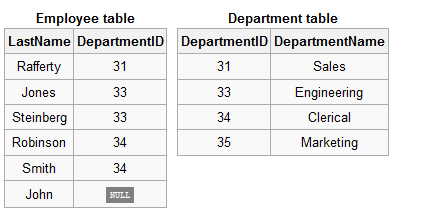
如何建立如右二表?

CREATE TABLE department
(
 DepartmentID INT,
 DepartmentName VARCHAR(20)
);
 
CREATE TABLE employee
(
 LastName VARCHAR(20),
 DepartmentID INT
);
 
INSERT INTO department(DepartmentID, DepartmentName) VALUES(31, 'Sales');
INSERT INTO department(DepartmentID, DepartmentName) VALUES(33, 'Engineering');
INSERT INTO department(DepartmentID, DepartmentName) VALUES(34, 'Clerical');
INSERT INTO department(DepartmentID, DepartmentName) VALUES(35, 'Marketing');
 
INSERT INTO employee(LastName, DepartmentID) VALUES('Rafferty', 31);
INSERT INTO employee(LastName, DepartmentID) VALUES('Jones', 33);
INSERT INTO employee(LastName, DepartmentID) VALUES('Steinberg', 33);
INSERT INTO employee(LastName, DepartmentID) VALUES('Robinson', 34);
INSERT INTO employee(LastName, DepartmentID) VALUES('Smith', 34);
INSERT INTO employee(LastName, DepartmentID) VALUES('John', NULL);

2013年6月13日 星期四

【Java】實作從網址下載pdf檔案

package Crawler;

import java.io.BufferedInputStream;
import java.io.BufferedOutputStream;
import java.io.File;
import java.io.FileOutputStream;
import java.io.IOException;
import java.net.URL;
import java.net.URLConnection;

/**
 * @author PTODUE
 *
 */
public class SavePdf {


 public static void main(String[] args) throws IOException {
  // TODO Auto-generated method stub
  String path = "http://XXX.XXX.XXX.XXX/a/b/XXXX.pdf";  //下載檔案的網址
  
  String filePath = url.getFile();   //檔案路徑  ex:a/b/XXXX.pdf
  String fileName ="";    //儲存檔名
  
  /*
   *取出XXXX.pdf
   *
  /
  int start = filePath.lastIndexOf("/") + 1;
        int end = filePath.lastIndexOf("?", start);
        if (end == -1)
            end = filePath.length();
        fileName = filePath.substring(start, end);
  
  String outputFile = "C:/downkload/"+fileName; // 要下載檔案的位置
  File desFile = new File(outputFile);

  if (desFile.exists())
   desFile.delete();
  
  
  URL url = new URL(path);
  URLConnection connection = url.openConnection();
  
  byte[] buffer = new byte[1024]; // InputStream

  // 設定接收資料流來源 ,就是要下載的網址
  BufferedInputStream bufferedInputStream = new BufferedInputStream(connection.getInputStream());
  // 設定 儲存要下載檔案的位置.
  BufferedOutputStream bufferedOutputStream = new BufferedOutputStream(new FileOutputStream(desFile));
  int length = -1;
  while ((length = bufferedInputStream.read(buffer)) != -1) {
   bufferedOutputStream.write(buffer,0,length);
  }
  bufferedOutputStream.flush();// 將緩衝區中的資料全部寫出
  bufferedInputStream.close(); // 關閉資料流
  bufferedOutputStream.close();
  System.out.println("下載完成");

 }
}

2013年6月12日 星期三

【Music】My Body Is A Cage


"My Body Is A Cage"
牢寵之軀

My body is a cage
我的軀體如同牢籠
That keeps me from dancing with the one I love 
阻止我與所愛之人一同共舞
But my mind holds the key
但我的思緒能將其開啟

My body is a cage
我的軀體如同牢籠
That keeps me from dancing with the one I love 
阻止我與所愛之人一同共舞
But my mind holds the key
但我的思緒能將其開啟

I'm standing on a stage
我站在臺上
Of fear and self-doubt
充滿恐懼 缺乏自信
It's a hollow play
這場戲碼毫無價值
But they'll clap anyway
但觀眾仍會為我鼓掌

My body is a cage
我的軀體如同牢籠
That keeps me from dancing with the one I love 
它阻止我與所愛之人一同共舞
But my mind holds the key
但我的思緒能將其開啟

You're standing next to me
你就站在我身邊
My mind holds the key
我的思緒能將其開啟

I'm living in an age
我活在某個世代
That calls darkness light
人們稱黑暗為光明
Though my language is dead
儘管我已喪失語言能力
Still the shapes fill my head
腦子仍忘不了那模樣

I'm living in an age
我活在某個世代
Whose name I don't know
不知道名稱為何
Though the fear keeps me moving 
儘管恐懼逼我前進
Still my heart beats so slow
我的心跳卻依舊緩慢

My body is a cage
我的軀體如同牢籠
That keeps me from dancing with the one I love 
阻止我與所愛之人一同共舞
But my mind holds the key
但我的思緒能將其開啟

You're standing next to me
你就站在我身邊
My mind holds the key
我的思緒能將其開啟
My body is a
我的軀體是個…

My body is a cage 
我的軀體如同牢籠
We take what we're given
我們接受賜與的恩惠
Just because you've forgotten 
只因罪惡已被遺忘
That don't mean you're forgiven
並非已被世人原諒

I'm living in an age
我活在某個世代
That screams my name at night
晚上有人大喊我的名字
But when I get to the doorway
等我走到門口
There's no one in sight
卻發現空無一人

My body is a cage
我的軀體如同牢籠
That keeps me from dancing with the one I love 
阻止我與所愛之人一同共舞
But my mind holds the key
但我的思緒能將其開啟

You're standing next to me
你就站在我身邊
My mind holds the key
我的思緒能將其開啟

Set my spirit free
解放我的靈魂
Set my spirit free
解放我的靈魂
Set my body free 
解放我的軀體
【Java】中文URL和URI的轉換

最近在做Crawler,爬回來的超連結發現,有些明明就是中文的網址,在瀏覽器上也是顯示中文,去查網頁的編碼是UTF-8沒錯但是抓回來的中文網址卻變成英文、數字、和百分比符號顯示亂碼的字串。
估狗後,這些亂碼並不是真的亂馬1/2(誤),而是URI編碼。欲知詳情,請見URL編碼。

URL  <-----> URI
以下只是臨時打的範例,不確定與法有無正確。參考參考。

import java.net.URLDecoder;
import java.net.URLEncoder;


String test = "URI編碼";
String demo ="";

demo = URLEncoder.decode(test , "UTF-8");
System.out.println("URI編碼:"+demo);
demo = URLEncoder.decode(test , "UTF-8");
System.out.println("URI解碼:"+demo);


【Blogger】在Blog中貼程式碼

二版日期:2017/10/10
初版日期:2013/06/12
---------------------------------------------------------------------------------------
試試這個
SlidesCodeHighlighter@github
或是  比較單調的
http://formatmysourcecode.blogspot.tw/

----------------------------我是分隔線---------------------------------------------
如果把程式碼直接貼到blog上,會造成排版跑掉,增加讀取的困難。
還好有這個Online syntax highlighting for "Java"


  1. 只要把程式碼貼入textbox中。
  2. 選取想要對應的style以及script語言。
  3. 按下Highlight,產生出的html和css標色語法,記得全選複製貼到blog中。


【Java】【轉載】 Apache HttpClient 4.x 使用 GET, POST 範例

在看範例之前先把一些重要連結整理給大家: 
想知道這次到底更動了哪些東西可以看:Apache HttpClient 首頁
官方的 Tutorial 在:Apache HttpClient Tutorial 
而 API DOC、說明文件則在:Apache HttpClient apidocs

相關的程式碼、jar 檔在:HttpComponents HttpClient 4.0 (GA)
注意,在寫程式前必需先將四個 jar 檔正確匯入,最後兩個(*)是選用,

commons-logging-x.x.x.jar
commons-codec-x.x.x.jar
httpcore-x.x.x.jar
httpclient-x.x.x.jar
apache-mime4j-x.x.x.jar (*)
httpmime-x.x.x.jar (*)
說了這麼多,以下是程式的範例,
第一個是傳回在 google 查詢 httpclient 的結果。
第二則是傳回台大圖書館查詢 Head First Java 的結果。

  • 實際安裝jar版本:
    • apache-mime4j.jar
    • commons-codec-1.4.jar
    • commons-logging-1.1.1.jar
    • httpclient-4.0.1.jar
    • httpclient-4.1.jar
    • httpcore-4.1.jar
    • httpmime-4.1.jar


package Crawler;

import java.io.IOException;
import java.util.ArrayList;

import org.apache.http.HttpStatus;

import org.apache.http.HttpResponse;
import org.apache.http.NameValuePair;
import org.apache.http.client.methods.HttpGet;
import org.apache.http.client.methods.HttpPost;
import org.apache.http.client.utils.URLEncodedUtils;
import org.apache.http.entity.StringEntity;
import org.apache.http.impl.client.DefaultHttpClient;
import org.apache.http.message.BasicNameValuePair;
import org.apache.http.util.EntityUtils;

/**
 * Apache HttpClient 4.x 使用 GET, POST 查詢網頁的範例
 * 
 * 
 */
public class Crawler extends DefaultHttpClient {

 public static void main(String[] args) throws IOException {

  DefaultHttpClient demo = new DefaultHttpClient();
  demo.getParams().setParameter("http.protocol.content-charset", "UTF-8");

  // Get Request Example,取得 google 查詢 httpclient 的結果
  HttpGet httpGet = new HttpGet(http://www.google.com.tw/search?q=httpclinet");
  HttpResponse response = demo.execute(httpGet);
  String responseString = EntityUtils.toString(response.getEntity());
  if (response.getStatusLine().getStatusCode() == HttpStatus.SC_OK) {
   // 如果回傳是200 OK 的話才輸出
   System.out.println(responseString);
  } else {
   System.out.println(response.getStatusLine());
  }
 
   // Post Request Example,查詢台大圖書館書籍
   ArrayList<NameValuePair> pairList = new ArrayList<NameValuePair>();
   pairList.add(new BasicNameValuePair("searchtype", "t"));
   pairList.add(new BasicNameValuePair("searchscope", "keyword"));
   pairList.add(new BasicNameValuePair("searcharg", "Head First Java"));
   pairList.add(new BasicNameValuePair("SORT", "D"));
  
   HttpPost httpPost = new
   HttpPost("http://tulips.ntu.edu.tw:1081/search*cht/a?");
   StringEntity entity = new
   StringEntity(URLEncodedUtils.format(pairList, "UTF-8"));
   httpPost.setEntity(entity);
   response = demo.execute(httpPost);
   responseString = EntityUtils.toString(response.getEntity());
   if (response.getStatusLine().getStatusCode() == HttpStatus.SC_OK) {
   // 如果回傳是200 OK 的話才輸出
   System.out.println(responseString);
   } else {
   System.out.println(response.getStatusLine());
   }
 }
}

2013年5月29日 星期三

【轉載】如何移除/刪除 無法移除的dll檔

全文轉貼自:

 刪不掉的dll  

有時候你要移除某個軟體,砍到最後會有資料夾,裡面有些dll檔,這時你若想刪除他們,尋個清靜,討人厭的視窗就會如上一般跳出來了!
如果你跟筆者一樣有「潔癖」,無法容忍這些在電腦裡的垃圾(別忘記,他們很有可能是病毒!!)
那妳無論如何都想要移除他們,可是刪不掉也移除不了呀!那就看本篇教學吧!
這時候你可以選擇 1.進入安全模式,有時後就能刪除這些檔案了  2.從網路上安裝一堆有的沒的"移除"軟體、什麼清除大師之類,小心軟體本身就是木馬!
那該怎麼辦呢?本篇教學教你不用安裝軟體,即可用手動方式刪除那些垃圾dll!

1.請按開始功能表執行cmd,進入DOS模式
2.切換到你刪除不了那個 dll的目錄,這時候執行“tasklist /m Filename.dll”
 這邊的Filename請改成你刪不掉的檔案命稱
 會出現類似下面畫面
依附的程式 
啊哈!這樣我們就知道,哪些exe檔有用到該支dll,我們將他們一一關掉就好了,比如說這邊,skype、chrome、photoscape都是筆者知道的應用程式,
直接關掉就可以了。

2.但等等....還有個explorer.exe,這支可不能亂關!或有時候,出現的.exe檔,連你都不知道那是什麼,這時候該怎麼辦呢?
 接著就要看我們的第二個指令:taskkill /f /PID 3240
 後面的3240請改成你所看到的PID號碼,譬如說看到 exflg.exe   1234     妳不知道怎麼關exflg,就用此指令直接關掉pid=1234的應用程式
 記得把所有依附的應用程式全部關閉才能刪除那個dll檔呀

3.但通常這種頑固的dll檔,可能是木馬,他們會很奸詐地跟explorer.exe綁在一起。甚至通常99%的病毒都會這樣綁。這時該怎麼辦呢?
 一樣!使用2.的指令強迫把explorer.exe關掉!這時候你會看到,桌面不見了!不用擔心~你還在dos畫面裡面,首先,先用指令 del *.* 賞那個.dll檔一個痛快吧!
 接著按下ctrl+alt+del,直接重開機就好(因為你不確定是否還關掉啥應用程式)

2013年5月10日 星期五

【工具】Notepad++

NotePad++

軟體名稱:notepad++

(http://notepad-plus-plus.org/download/v6.3.3.html)

軟體資訊:ver. 2.33, 2013 May 05


快捷鍵:
單行註解/取銷註解    ctrl+q
多行註解                   ctrl+shift+q


--------------------------------------------
之後有用到其他的,在補充

2013年4月2日 星期二

【工具】集合多種工具

全文參考至好用的工具 。

訊息交換,聊天

  • IRC
    • http://webchat.freenode.net/?channels=g0v.tw (零時政府)
    • 為了可以和這些參加活動的人同時交流問題,強烈建議一定要學習使用 IRC。在 IRC 上,可以簡單的和大家討論意見,也可以在上面找幫手,或是參與大家的討論。
    • 相關連結:

專案管理、事項追蹤:

製作網站原型

  • moqups
    • https://moqups.com/
    • moqups 是一個好用的線上 web UI 設計工具,可以用來快速產生網頁原型。如果您有個網站想要示範給大家看,讓其他人了解您的想法,可以嘗試使用 moqups 先把網站的原形做出來,方便後續和大家討論其中的功能。
    • 相關連結:

程式碼管理:

  • github
    • 網址:http://github.com
    • 說明:很多人都有這樣的煩惱:程式碼修過好幾次以後,早已認不得最新的是哪個版本,最舊的是哪個版本。為了解決這個問題,Linus Torvalds開發了 git 作為管理程式碼的工具。git 是一個很好用的分散式程式碼版本管理工具。而 github 則是使用 git 的社交網站。每個人都可以有自己的程式碼,你可以在上面複製,或是協助修改別人的程式碼。
    • 相關連結:
      • http://www.slideshare.net/littlebtc/git-5528339
      • http://marklodato.github.com/visual-git-guide/index-en.html

程式碼測試工具

檔案共享:

文件共享:

  • google drive
  • hackpad
    • 網址:https://hackpad.com/
    • 說明:在電腦上如果想要紀錄一些簡單的資訊,應該很少有人會選擇新增一個 word 檔案,通常比較可能會新建一個純文字檔案。hackpad 就是一個多人共同編輯的純文字檔案。而它不單純只是純文字檔,也支援簡單的格式,可以簡單的製作一個看起來還不錯的文件。在線上工作,常常需要整理文件、列出待辦事項、徵求幫手、提供教學文件、記錄備忘等等。這些都可以用 Hackpad 簡單做到。
    • 相關連結:

圖片共享:

  • imgur
    • 網址:http://imgur.com
    • 說明:imgur 是一個好用的圖片分享網站。把圖片傳上去以後,imgur 會給您一個簡短的網址,方便在各個地方分享圖片。
  • droplr