2014年10月27日 星期一

【Android】解決 Unable to execute dex: Multiple dex files define
|
[方法一]
I had the same problem, quite weird because it was happening only when using Eclipse (but it was OK with Ant). This is how I fixed it:
[方法二]
NON OF THE ABOVE METHODE WORKED FOR ME BUT MINE IS WORKED LIKE A CHARM!
The problem happens when user builds the dependent library with eclipse. So to get the solution Step 1: Delete the library (like support library project v4 or v13) from Eclipse with delete workspace source permanantly Step 2: Re import the library and include it to your project Step 3: Clean and Rebuild DONE!
ref:
|
【Android】android:typeface
Android字型改變,利用TextView內的setTypeface來指定使用字型,但必須透過外部資源assets,引用外部的字體(True Type Font),藉由Typeface類別的createFromAsset方法,讓TextView透過setTypeface來改變字型。
ref:
Victoria IT Journal
- Step1.在/res中,建立fonts資料夾
- 將外部字型檔放在fonts資料夾內(字型檔必須是 .ttf )
ref:
Victoria IT Journal
2014年10月25日 星期六
【Android】array to json/json to array
private void JSONEncode() throws JSONException { JSONArray jsonArray = new JSONArray(); for (int i = 0; i < name.length; i++) { JSONObject jsonObject = new JSONObject(); jsonObject.put("name", name[i]); jsonObject.put("id", id[i]); jsonObject.put("score", score[i]); jsonArray.put(jsonObject); } Log.i("JSON String", jsonArray.toString()); JSONString = jsonArray.toString(); } private void JSONDecode() throws JSONException { JSONArray jsonArray = new JSONArray(JSONString); Log.i("Number of Entries", Integer.toString(jsonArray.length())); for (int i = 0; i < jsonArray.length(); i++) { JSONObject jsonObject = jsonArray.getJSONObject(i); String name = jsonObject.getString("name"); int id = jsonObject.getInt("id"); double score = jsonObject.getDouble("score"); Log.i("Entry", "name: " + name + ", id: " + id + ", score: " + score); } }ref:Alan's Development Notes


2014年10月24日 星期五
【Android】自訂Activity頁面切換效果 overridePendingTransition
類似PowerPoint在切換頁面的效果
overridePendingTransition(android.R.anim.fade_in, android.R.anim.fade_out);
需添加在finsh()或startactivity()之後
ex.
Intent intent = new Intent();
intent.setClass(MainActivity.this, SecondActivity.class);
startActivity(intent);
overridePendingTransition(R.anim.slide_in_up, R.anim.slide_out_down);
所以需要在res/anim添加對應的xml檔
相關範例可以在 sdk\platforms\android-21\data\res\anim中就可以找到
android2.0也就是level 5之後都有範例可以參考
(實現淡入淡出的效果)android.R.anim.fade_in, android.R.anim.fade_out;
(由左向右滑入的效果)android.R.anim.slide_in_left, android.R.anim.slide_out_right
(由上向下滑入的效果)android.R.anim.slide_in_up, android.R.anim.slide_out_down
當然也可以自定義動畫效果
2014年10月23日 星期四
【Android】Android library projects cannot be launched 解決辦法
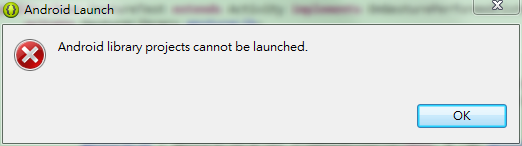
如圖顯示, "Android library projects cannot be launched"。
解決辦法:
在專案按右鍵>Properties>Android>Library區塊中>Is Library勾選取消即可。
ref:
【Android】R cannot be resolved to a variable原因和解決辦法
如果一開始預設選的sdk是4.x以上,res/底下會多了各一個value-v11, value-v14 資料夾,用來放一些layout/theme。
這些layout是根據不同的SDK version去gen出來的!
其實它的目的就是要你吃它新推出的action bar的概念!
但是如果你把project default sdk version改成2.x,2.X SDK不認得那兩個資料夾是什麼!!!
所以R.java會一直build不出來!
解決辦法就是把那兩個資料夾(value-v11, value-v14 資料夾)砍了!
備註:
ref:
Ken Yang 筆記
這些layout是根據不同的SDK version去gen出來的!
其實它的目的就是要你吃它新推出的action bar的概念!
但是如果你把project default sdk version改成2.x,2.X SDK不認得那兩個資料夾是什麼!!!
所以R.java會一直build不出來!
解決辦法就是把那兩個資料夾(value-v11, value-v14 資料夾)砍了!
備註:
- layout裡面以前有一個attribute是"fill_parent",但在某個版本SDK被deprecated!改成"match_parent"
- 而4.X就是用match_parent, 如果使用2.x sdk就要"把match_parent改成fill_parent"。
ref:
Ken Yang 筆記
【Android】使用 ViewHolder Pattern改善Adapter效率
To improve performance, we should modify the custom adapter by applying the ViewHolder pattern which speeds up the population of the ListView considerably by caching view lookups for smoother, faster item loading:
public class UsersAdapter extends ArrayAdapter<User> {
// View lookup cache
private static class ViewHolder {
TextView name;
TextView home;
}

public UsersAdapter(Context context, ArrayList<User> users) {
super(context, R.layout.item_user, users);
}

@Override
public View getView(int position, View convertView, ViewGroup parent) {
// Get the data item for this position
User user = getItem(position);
// Check if an existing view is being reused, otherwise inflate the view
ViewHolder viewHolder; // view lookup cache stored in tag
if (convertView == null) {
viewHolder = new ViewHolder();
LayoutInflater inflater = LayoutInflater.from(getContext());
convertView = inflater.inflate(R.layout.item_user, parent, false);
viewHolder.name = (TextView) convertView.findViewById(R.id.tvName);
viewHolder.home = (TextView) convertView.findViewById(R.id.tvHome);
convertView.setTag(viewHolder);
} else {
viewHolder = (ViewHolder) convertView.getTag();
}
// Populate the data into the template view using the data object
viewHolder.name.setText(user.name);
viewHolder.home.setText(user.hometown);
// Return the completed view to render on screen
return convertView;
}
}
2014年10月21日 星期二
【Android】Handler example
ref:
http://examples.javacodegeeks.com/android/core/os/handler/android-handler-example/
http://andcooker.blogspot.tw/2012/09/android-runnable-handler.html
http://iamshiao.blogspot.tw/2010/12/androidhandlerthread.html
http://imax-live.blogspot.tw/2012/12/progressbar_18.html
http://bluequiet.blogspot.tw/2014/09/service-handler-thread.html
http://iamshiao.blogspot.tw/2010/12/androidhandlerthread.html
http://blog.csdn.net/veryitman/article/details/6611138
訂閱:
文章 (Atom)